From 21 June 2026, Independent Reserve is introducing changes to the address book to support the crypto Travel Rule, which comes into effect on 1 July 2026. Before you can withdraw crypto to an external wallet, your crypto address needs to be saved and verified in your address book.
This guide explains how to add and verify an external crypto wallet address, how to withdraw crypto, and what happens if you receive a deposit from an unverified address.
Key takeaways
- Address book changes go live on 21 June 2026. The Travel Rule becomes mandatory on 1 July 2026.
- Before withdrawing crypto to an external wallet, that address must be saved and verified in your address book.
- Only wallet addresses you own or control can be added. Independent Reserve does not support transfers to wallets owned by another person.
- To deposit crypto, send to your Independent Reserve deposit address found under accounts. In most cases, no action is required, but you may be asked to verify the sending address or transaction.
What is the crypto Travel Rule?
The crypto Travel Rule is a global regulation that comes into effect in Australia on 1 July 2026. It is enforced by AUSTRAC to prevent money laundering and terrorism financing.
Under this rule, crypto platforms must collect basic sender and recipient information and share this information with the receiving platform when you request a crypto withdrawal. It brings crypto transfers closer to how traditional bank transfers are handled.
As part of this, all withdrawals from Independent Reserve must be made to verified addresses controlled and owned by you or your verified entity and stored in your address book.
| Important: You only need to verify external wallet addresses, not your assigned Independent Reserve deposit address. Only addresses you own or control can be added. Transfers to wallets owned by another person are not supported on Independent Reserve. If your Independent Reserve account is a company/trust/SMSF account, then we can only facilitate transfers to a wallet owned by your company/trust/SMSF. |
How to add and verify an external wallet address
From 21 June 2026, you will be required to verify your external wallet address in your address book before attempting a withdrawal.
Step 1: Open the address book
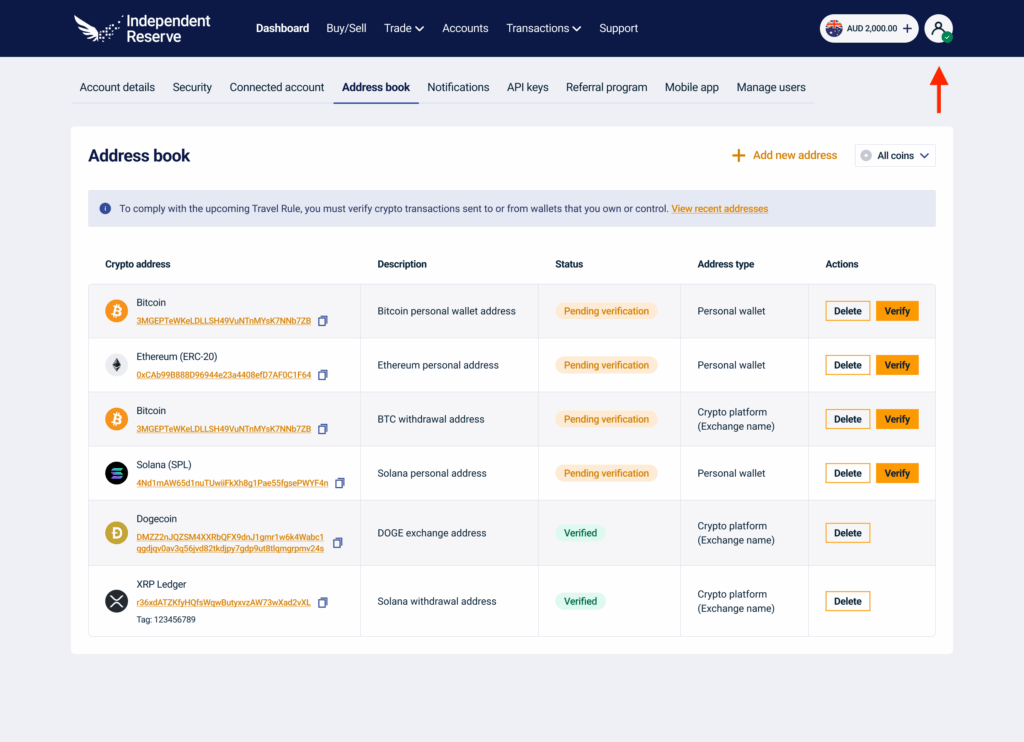
- Log in to your Independent Reserve account.
- Click your user profile icon at the top right of the page on desktop or on the side menu in the mobile app, select settings, then click the address book tab.
- Click add new address. If you already have an address added in your address book, click the verify button.
Step 2: Enter your wallet details
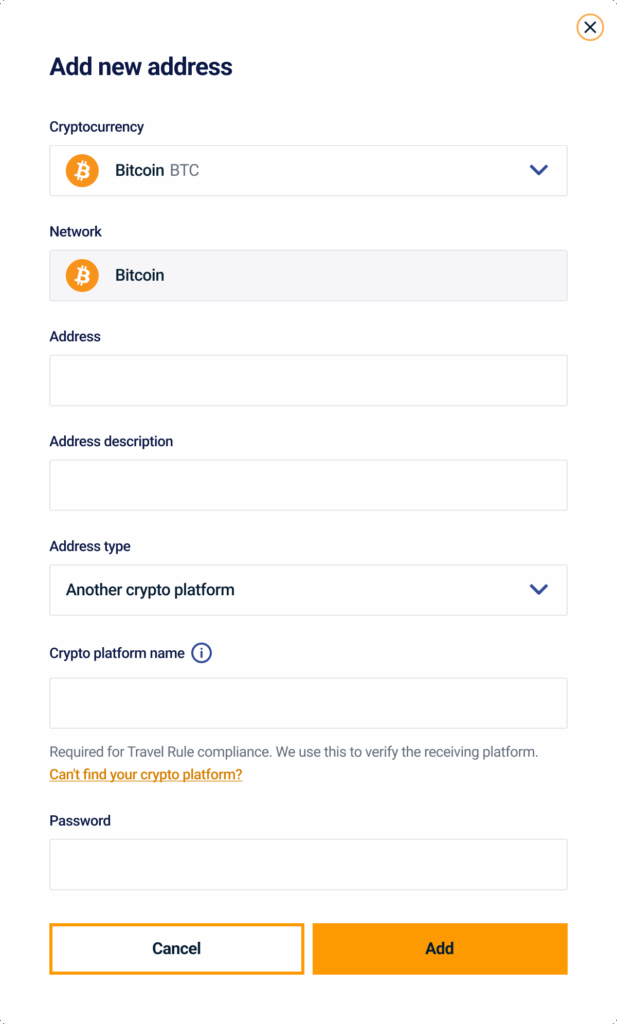
- Select your cryptocurrency from the dropdown.
- Select the network you would like to use. Make sure this matches the network supported by your external wallet for this currency.
- Enter the wallet address.
- Add an address description to help you identify it later, for example, ‘My ledger’ or ‘My exchange wallet’.
- Select the address type. If this is a crypto platform address, select the platform name from the list.
- Enter your Independent Reserve account password.
- Click add.
Step 3: Confirm with SMS code
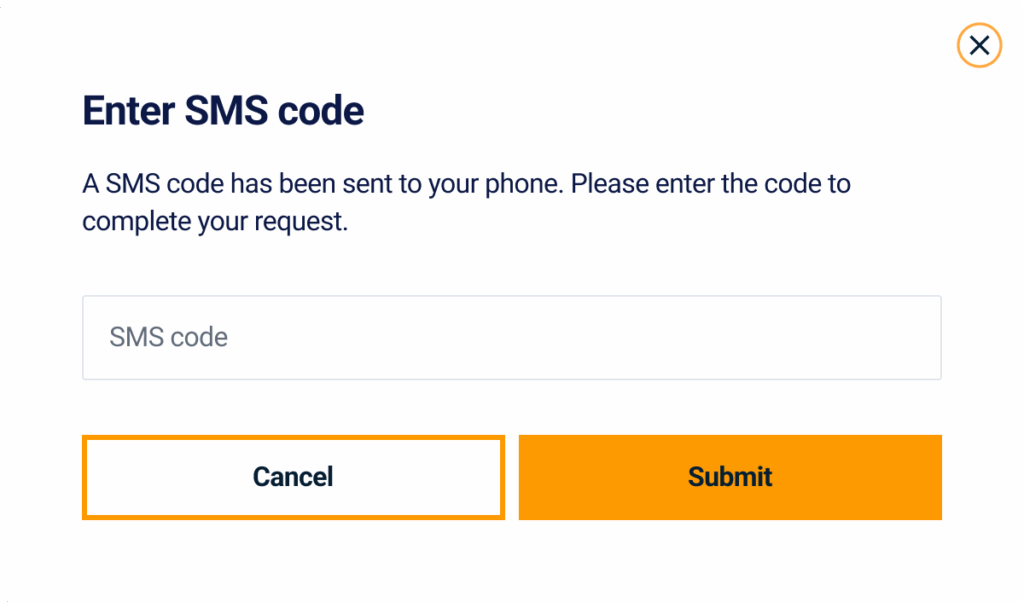
An SMS code will be sent to your registered mobile number. Enter the code and click submit.
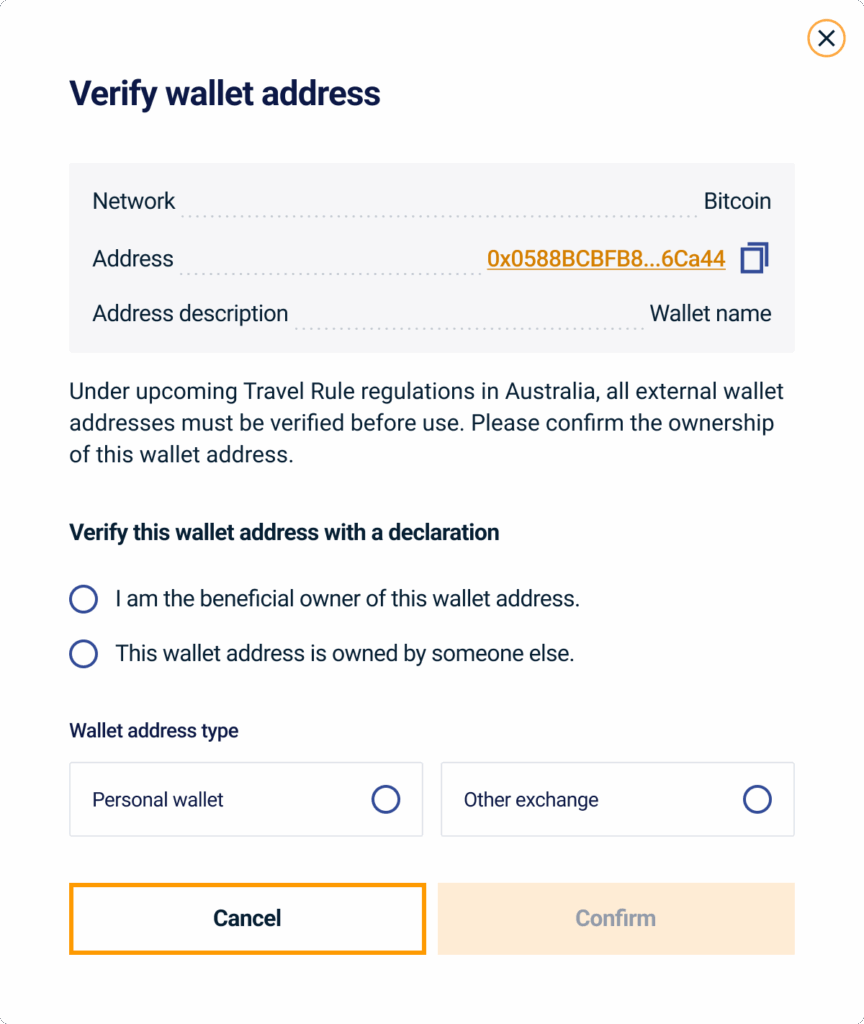
Step 4: Confirm ownership of wallet address
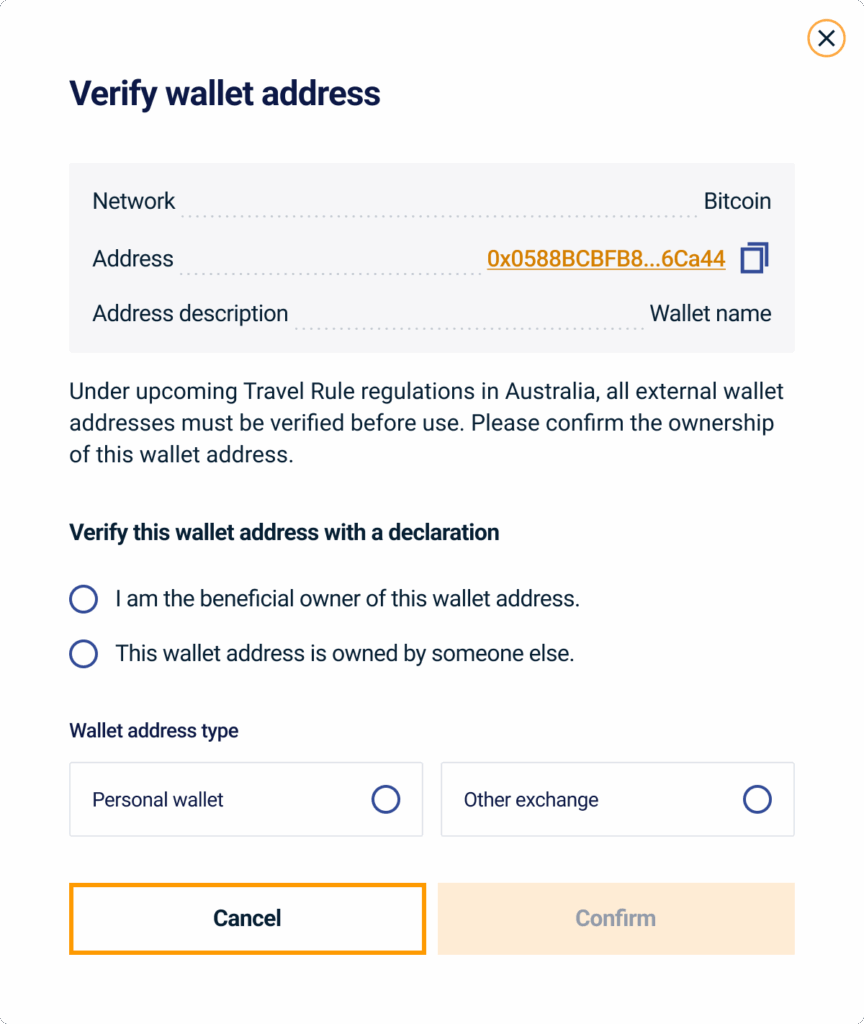
You are required to declare whether or not you are the owner of the wallet address. You will not be able to withdraw to wallets that are not owned by you.
Step 5: Address confirmed
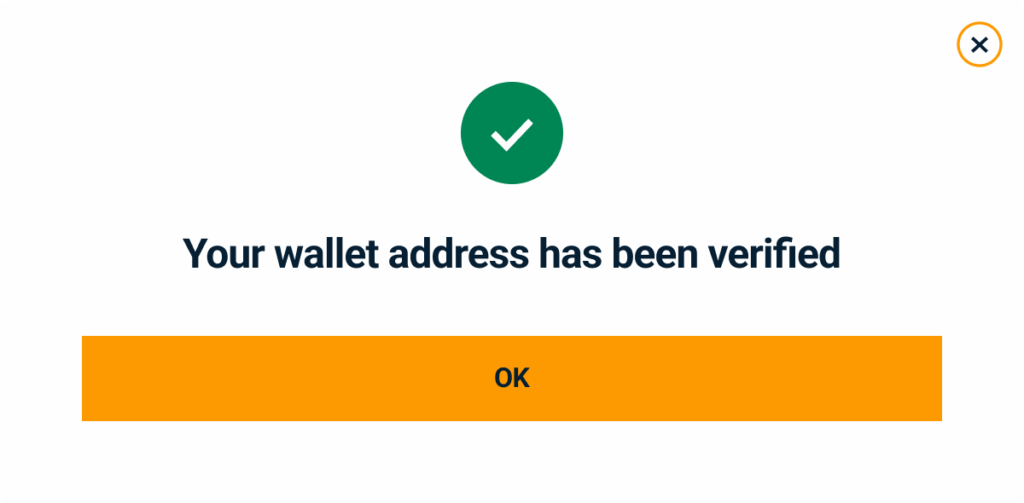
Your address is now saved in your address book. Note that if this is the first time withdrawing to this address, you may receive an email confirmation request. You will have 60 minutes to confirm before it expires.
How withdrawals work
When you initiate a withdrawal, you will be asked to select a verified address from your address book. If the address you want to withdraw to is not already saved, you will be prompted to add and or verify it before the withdrawal can proceed.
Adding an address during a withdrawal
- Go to accounts, find the crypto you want to withdraw, and click withdraw.
- If your destination address is not in your address book, click add and verify an address.
- Complete the address details, verify via SMS and declare ownership.
- Once verified, your withdrawal will proceed.
Receiving a deposit from an unverified address
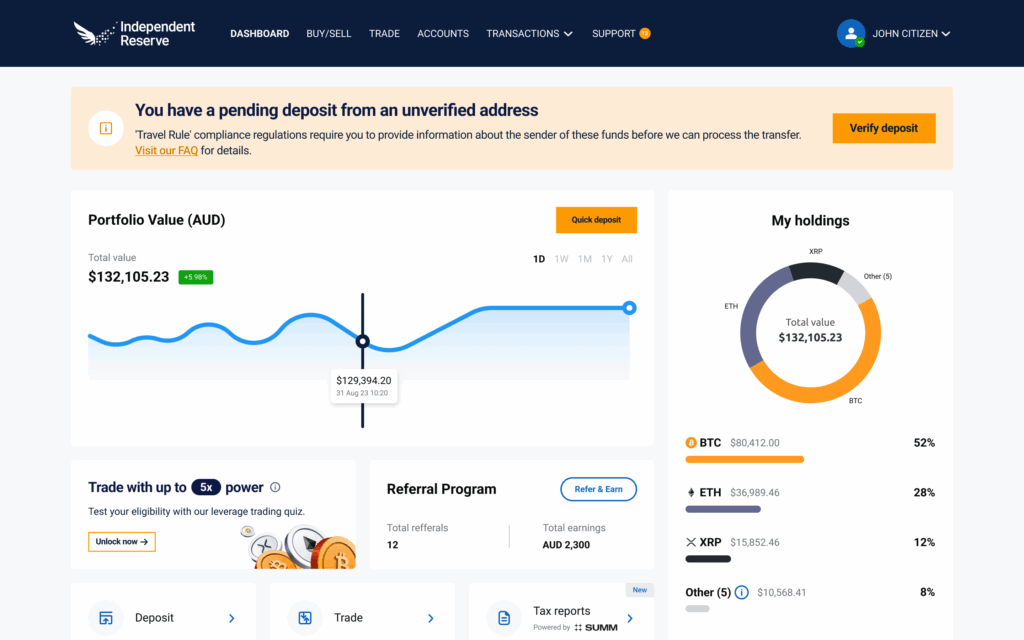
If you receive a deposit from another crypto platform or custodial provider, that platform must send Travel Rule information to Independent Reserve as part of their compliance requirements. In most cases, your deposit will be processed automatically.
In some situations, you may be asked to confirm details about the sending wallet. If prompted:
- Log in to your account. A notification on your dashboard will indicate a pending deposit.
- Click verify deposit and follow the on-screen prompts.
- Confirm that the sending wallet is one you own or control.
| Important: Independent Reserve does not accept deposits from wallets owned by another person. If you cannot confirm ownership of the sending wallet, please contact our support team for assistance. These deposits may need to be returned to the sender. |
Keep your address book up to date
Adding and verifying your withdrawal addresses takes a few minutes and only needs to be done once per address.
Frequently asked questions
Do I need to verify my Independent Reserve deposit address?
No. You only need to verify external wallet addresses, those outside of Independent Reserve.
Are addresses verified automatically once added?
Yes. All addresses are verified automatically once you complete the add new address or verify flow. Personal wallets and crypto platform addresses are both ready to use immediately after confirmation.
Do I need to re-add a wallet address if it changes?
Yes, if you have a new address, then you must add it to your Independent Reserve address book and verify it.
Can I send crypto to someone else’s wallet?
No. Independent Reserve only supports transfers to wallets you own or control. Transfers to wallets owned by another person are not available.
What happens if I try to withdraw to an address not in my address book?
You will be prompted to add and verify the address before the withdrawal can proceed. The web portal and mobile app will not allow a withdrawal to an unverified address.