How does the AutoBuy strategy work?
Independent ReserveUpdated Knowledge base4 min read

AutoBuy
The AutoBuy strategy allows you to automatically buy one of our supported cryptocurrencies whenever a deposit is credited to your account. You can choose a maximum percentage of your deposit to be used, and you can also set a hard upper limit on the size of the buy order and the price you wish to pay. Read below for more information.
The AutoBuy strategy is part of the AutoTrader framework. For more information on the AutoTrader system, see the AutoTrader help page.
Creating a new AutoBuy Strategy
To create an AutoBuy Strategy:
- On your desktop web browser, log in and navigate to the Trade screen.
- Click on AutoTrader.
- Click on Create new strategy and then Create your first strategy.
- Click on AutoBuy.
- Select the Cryptocurrency you wish to buy (i.e. Bitcoin, Ethereum, etc)
- Select the Deposit Percentage (%) you wish to allocate to that cryptocurrency and/or the Spend Limit.
- Select the Price Limit if you do not wish to purchase the cryptocurrency automatically if it's over this price.
- Click Create
Interface
| CryptocurrencyChoose the cryptocurrency you wish the strategy to buy when your deposit is credited.To choose the fiat currency this strategy will trigger from use the fiat currency selector at the top left of the page.Deposit PercentageReduces the amount of fiat used in the crypto purchase. Most people leave this at 100%.Example 1: You set the Deposit Percentage to 70% and deposit $200, the strategy will buy $140 worth of crypto, leaving $60 from the deposit in your account.Spend LimitThis will cap the strategy's buy order fiat amount. This cap is applied after the Deposit Percentage adjustment. This is the most common way to limit your strategy order size.Example 1: You set the Deposit Percentage to 100%, and set the Spend Limit to $110. You make a deposit of $500. The AutoBuy strategy will buy you $110 worth of crypto.Example 2: You set the Deposit Percentage to 80%, and set the Spend Limit to $110. You make a deposit of $500. 80% of $500 is $400, but as the Spend Limit is set to $110, the strategy will only buy $110 worth of crypto.Example 3: You set the Deposit Percentage to 10%, and set the Spend Limit to $110. You make a deposit of $500. 10% of $500 is $50. This is below your Spend Limit, and so the strategy will buy you $50 worth of crypto. | 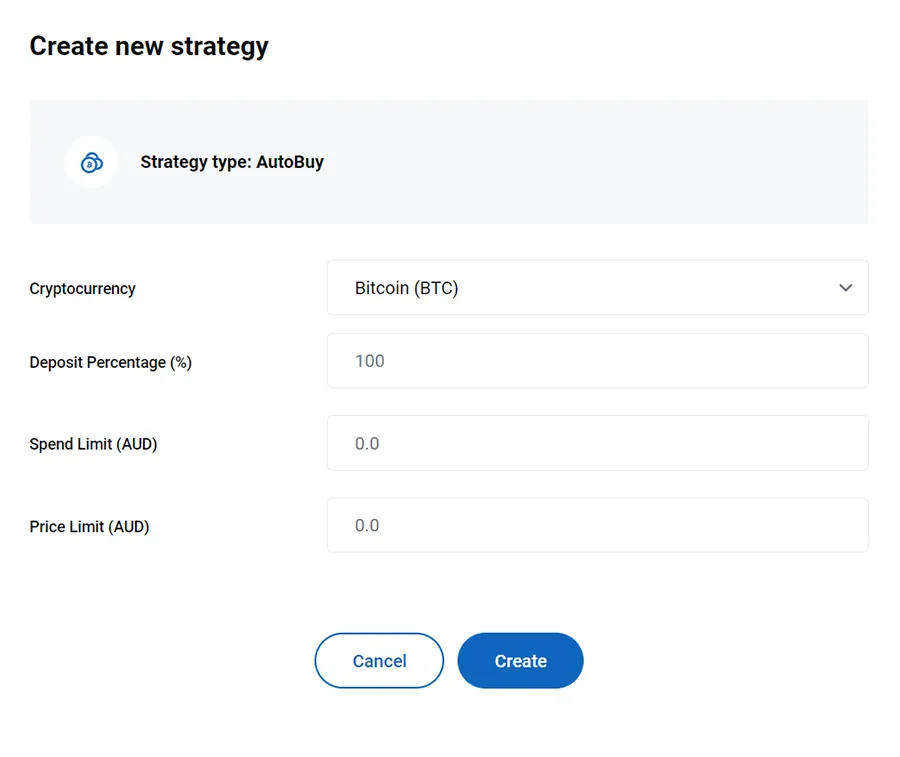 |
|---|
Price Limit
This allows you to set a maximum limit on the buy price for the crypto you're auto-buying. Be aware that if the current market price for the crypto you're buying in this strategy is above your Price Limit then the strategy will not execute, and your deposit will remain in your account. Setting this field to 0 will mean there is no limit, and your strategy will always execute. A standard dollar cost averaging strategy would set this to 0.
Creating multiple AutoBuy strategies
Creating multiple AutoBuy strategies is allowed, but the cumulative Deposit Percentage must not add up to more than 100%. There is no set order in which the strategies execute in, and as such each strategy uses the initial deposit amount when calculating how much of the deposit to use. If you create a strategy with a Deposit Percentage of 100%, no other AutoBuy strategies can be created.

About the author
Independent Reserve
The trusted cryptocurrency exchange to buy and sell Bitcoin and other major cryptocurrencies. Low fees, deep liquidity and tight spreads.
Related Posts:
Tags:educationknowledge baseautotraderproductguidedollar cost averagingdcaautobuy